SPECIFICATIONS
| MODEL | JIG-USB-HD |
| Function | Enables Setup and Control of STC-HD213 Series Cameras |
| Computer Interface | USB 2.0 |
| Interface Connector | USB-A |
| Camera Control Connector | 3.5 mm Jack |
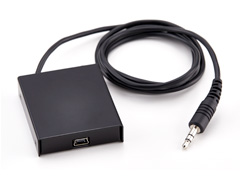
| MODEL | JIG-USB-HD |
| Function | Enables Setup and Control of STC-HD213 Series Cameras |
| Computer Interface | USB 2.0 |
| Interface Connector | USB-A |
| Camera Control Connector | 3.5 mm Jack |
Communication software installation is required:
Please download “KPACtrl” software from software download then execute install file.
Driver Installation:
The driver files for communication tool copy to the host PC when installing KPACtrl software.
When connecting JIG-USB-HD communication tool to the host PC first time, it is necessary to apply USB virtual serial driver for communication.
The driver files of USB virtual serial driver copy to “SentechKPACtrldrv”
“Sentech USB Serial Port driver” installs automatically when connecting JIG-USB-HD to PC after installed driver for USB virtual serial driver.
Please confirm COM number of USB Serial Port at Device maneger on Windows.
Running KPACtrl communication software.
Selects “Port Setting” under “Comm” on menu then sets COM number for communication, which is confirmed COM number in the host computer Device Manager.
DOCUMENTATION
| User Manual STC-HD213SDI |  |
| User Manual STC-HD213 Series | |
USB CONTROLLER SOFTWARE
| File Name | Supported Models | Supported OS | Version | Date | Size | File Type |
|---|---|---|---|---|---|---|
| KPACtrl | STC-HD853HDMI | Windows 10 (32bit(x86) / x64) | 1.01 | 2018-11-16 | 2.88 MB |  |
| JTBCtrl | STC-HD213 | Windows 10 (32bit(x86) / x64) | 1.02 | 2021-09-21 | 2.96 MB | |
| HD133Ctrl | STC-HD93 | Windows 10 (32bit(x86) / x64) | 1.18 | 2016-04-04 | 3 MB | |